

Warum knotenbasierte KI-Workflows die kreative Produktion verändern
Erfahren Sie, wie WK8 knotenbasierte KI-Workflows verwendet, um organische Inhalte zu skalieren und gleichzeitig die Markenkonsistenz, die kreative Kontrolle und die von Menschen geleitete Designqualität zu schützen.

Sie suchen einen strategischen Marketingpartner?
Skalieren Sie Ihr Unternehmen, um der Konkurrenz zu entwachsen.
30-minütiges kostenloses Beratungsgespräch mit unseren Experten
Wichtige Erkenntnisse
- KI funktioniert am besten, wenn sie einen strukturierten kreativen Prozess unterstützt, nicht wenn sie ihn ersetzt.
- Knotenbasierte Workflows helfen Kreativteams dabei, Inhalte zu skalieren, ohne die Markenkonsistenz zu verlieren.
- Die besten Ergebnisse werden erzielt, wenn die richtigen Werkzeuge für jeden Produktionsschritt kombiniert werden.
- Menschliche Designer sind immer noch für die wichtigsten Teile verantwortlich, einschließlich Geschmack, Regie und Komposition.
- Der Unterschied zwischen starken KI-gestützten Inhalten und generischem Output liegt in der Qualität des Systems, das dahinter steckt.
Organisches Content Marketing beruhte schon immer auf den gleichen Grundlagen: einer wiedererkennbaren Stimme, konsistentem Storytelling und kreativen Entscheidungen, die sich bewusst anfühlen.
Das hat sich mit KI nicht geändert.
Was sich geändert hat, ist die Art und Weise, wie starke Kreativteams beginnen, es zu nutzen. Anstatt KI wie einen Spielautomaten zu behandeln, eine Eingabeaufforderung einzugeben und auf Gold zu hoffen, entwickeln die besten Teams strukturierte, knotenbasierte Workflows. Visuelle Leinwände, bei denen jeder Knoten einem bestimmten Zweck dient: Generieren, Maskieren, Neubeleuchten, Stylen, Hochskalieren, Animieren, Exportieren.
Das ändert alles.
KI hört auf, eine Maschine mit zufälliger Ausgabe zu sein, und wird Teil eines echten Produktionssystems. Etwas, das reproduzierbar, gemeinsam nutzbar und im Laufe der Zeit leicht zu verfeinern ist.
Für organische Teams ist das wichtig, denn das Ziel besteht nicht nur darin, mehr zu schaffen. Das eigentliche Ziel besteht darin, Inhalte zu skalieren, ohne dabei Originalität, kreative Kontrolle, Markenintegrität oder die Designentscheidungen zu verlieren, die dafür sorgen, dass sich eine Marke wie sie selbst anfühlt.
Warum knotenbasierte KI-Tools das Spiel für Kreative verändern
Sie erhalten mehr kreative Freiheit, ohne an Konsistenz zu verlieren
Tools, die nur auf Eingabeaufforderung zugreifen, eignen sich hervorragend zum Erkunden. Sie sind nützlich, wenn Sie eine Idee testen, eine Stimmung entdecken oder schnell Anweisungen erstellen möchten.
Aber in dem Moment, in dem Sie Inhalte in mehreren Formaten, Sprachen und Kanälen auf eine Weise bereitstellen müssen, die sich dennoch markengerecht und kohärent anfühlt, wird schnelles Glück zur Belastung.
KI ist bei bestimmten Aufgaben sehr gut. Sie kann generieren, verbessern, neu mischen, isolieren oder sich anpassen. Aber für sich allein kommt es mit einem kompletten kreativen System nicht gut zurecht. Aus diesem Grund funktionieren strukturierte Workflows besser: KI wird als Werkzeug innerhalb eines Prozesses verwendet, nicht als Orchestrator des gesamten Projekts.
Hier werden knotenbasierte Editoren mächtig. Sie machen den Prozess:
- Sichtbar, weil jeder Schritt explizit ist
- Wiederholbar, da derselbe Workflow erneut ausgeführt werden kann
- Einstellbar, da ein Knoten geändert werden kann, ohne alles neu aufzubauen
- Teilbar, da das Team die Logik als Vorlage wiederverwenden kann
Was uns am besten gefällt, ist, dass die Menschen auf dem Laufenden bleiben, wo sie am wichtigsten sind: Richtung, Geschmack, Urteilsvermögen, Zusammensetzung und Markeninterpretation.
Zu den Tools in diesem Bereich gehören knotenbasierte Umgebungen wie Freepik Spaces, Krea Nodes, Fal Workflows, Figma Weave und andere, mit denen Kreativteams verschiedene Tools und Modelle auf einer visuellen Leinwand kombinieren können.
Mix-and-Match-Modelle schlagen je nach Modell
Einer der größten Fehler, den Teams machen, ist die Erwartung, dass ein Modell alles gut macht.
In Wirklichkeit sind verschiedene Modelle in verschiedenen Bereichen stark: Komposition, Posenkontrolle, Produktrealismus, Beleuchtung, Hochskalierung, Animation, Stimme, 3D oder Musik.
Knotenbasierte Workflows lösen dieses Problem, indem Sie für jeden Schritt das beste Tool auswählen können, anstatt ein Modell zu zwingen, die gesamte kreative Kette abzuwickeln.
In unseren eigenen Tests war Nano Banana Pro beispielsweise eine der stärksten Optionen, um qualitativ hochwertige menschliche Bilder zu erzeugen und gleichzeitig Textur und Details über mehrere Iterationen hinweg beizubehalten. Das bedeutet nicht, dass es Designer ersetzt. Es bedeutet einfach, dass wir das richtige Modell für die richtige Aufgabe verwenden und diese Ergebnisse dann in einen kontrollierteren Designprozess einbringen können.
Sie wechseln von isolierten Assets zu Content-Systemen
Hier wird KI für das Bio-Marketing wirklich nützlich.
Sobald ein Workflow stabil ist, produzieren Sie keine einmaligen Assets mehr. Sie erstellen eine Content Engine:
- ein starkes Konzept
- mehrere visuelle Variationen
- konsistentes Branding
- messbare Ergebnisse
Das ist eine viel wertvollere Verwendung von KI als die Generierung zufälliger Grafiken in großen Mengen.
Denn zu diesem Zeitpunkt lautet die Frage nicht mehr „Kann KI ein Bild machen?“
Die eigentliche Frage lautet: „Kann unser Team ein wiederholbares System entwickeln, das qualitativ hochwertige Inhalte in großem Maßstab produziert, ohne die Marke zu verwässern?“
Darin liegt der wahre Vorteil.
Ein praktischer Workflow-Blueprint für Qualität im großen Maßstab
Hier ist eine vereinfachte Version davon, wie unsere Designer bei WK8 KI-Node-Builder verwenden, um organische Inhalte in großem Maßstab für Kunden zu erstellen, während die endgültige Ausgabe menschengesteuert und markenspezifisch bleibt.
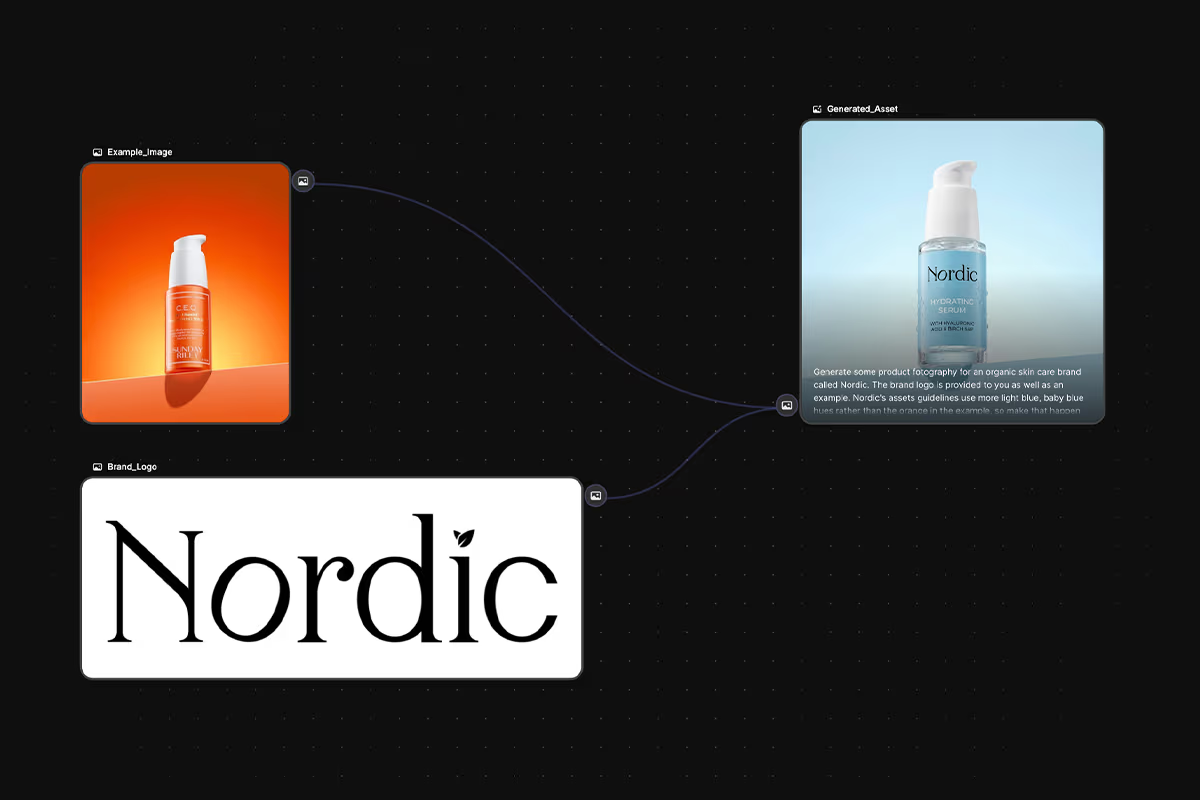
Unser aktueller Stack hängt vom Anwendungsfall ab, aber in diesem Beispiel haben wir Freepik Spaces für Node-Workflows, Nano Banana Pro für die Bildgenerierung und Figma Buzz für die Umwandlung dieser Assets in fertige Layouts verwendet.
Schritt 1: Definieren Sie die DNA der Marke
Bevor wir etwas generieren, beginnen wir immer mit der gleichen Frage: Was bedeutet „markengerecht“ eigentlich für diesen Kunden?
Dazu gehören Details wie:
- Beleuchtung
- Sprache der Farben
- umrahmend
- Textur
- Typografie
- Ikonographie
- welche Art von Ton fühlt sich richtig an
- welche Art von Ton ist völlig tabu
- welche visuellen Abkürzungen oder Klischees niemals auftauchen sollten
Für uns ist dieser Schritt einfacher, da jedes seriöse Kundenprojekt bereits mit einem Dokument mit den Markenrichtlinien beginnt. Das gibt unserem Team eine echte Grundlage, bevor ein KI-Tool geöffnet wird.
Dieser Teil ist entscheidend.
Die KI-Qualität wird stark von der Qualität der Eingabe beeinflusst, und starker Input bedeutet nicht nur, eine bessere Aufforderung zu schreiben. Es bedeutet, dass hinter den Bildern ein klarer strategischer Rahmen steht.
Schritt 2: Erstellen Sie den Workflow, nicht nur das Asset
Sobald die kreative Richtung klar ist, entscheidet das Team anhand der Zielsetzung des Kunden, welche Formate und Kanäle sinnvoll sind.
In diesem Beispiel haben wir uns auf einfache 1:1 -Instagram-Posts konzentriert.
Das mag einfach klingen, aber die wichtige Veränderung ist folgende: Wir bauen keine Anlage auf und machen Feierabend. Wir erstellen den Workflow, der hinter dem Asset steht.
Das gibt uns die Möglichkeit, später mehrere Varianten für verschiedene Kampagnen, Kanäle oder A/B-Tests zu generieren, ohne jedes Mal bei Null anfangen zu müssen.
Dies ist einer der größten Vorteile strukturierter KI-Workflows. Sie schaffen Hebelwirkung. Aus einer kreativen Richtung kann eine ganze Familie von Assets werden, ohne dabei die visuelle Konsistenz zu verlieren.
Schritt 3: Generieren Sie flexible visuelle Komponenten
Hier wird KI sehr nützlich, aber nur innerhalb von Grenzen.
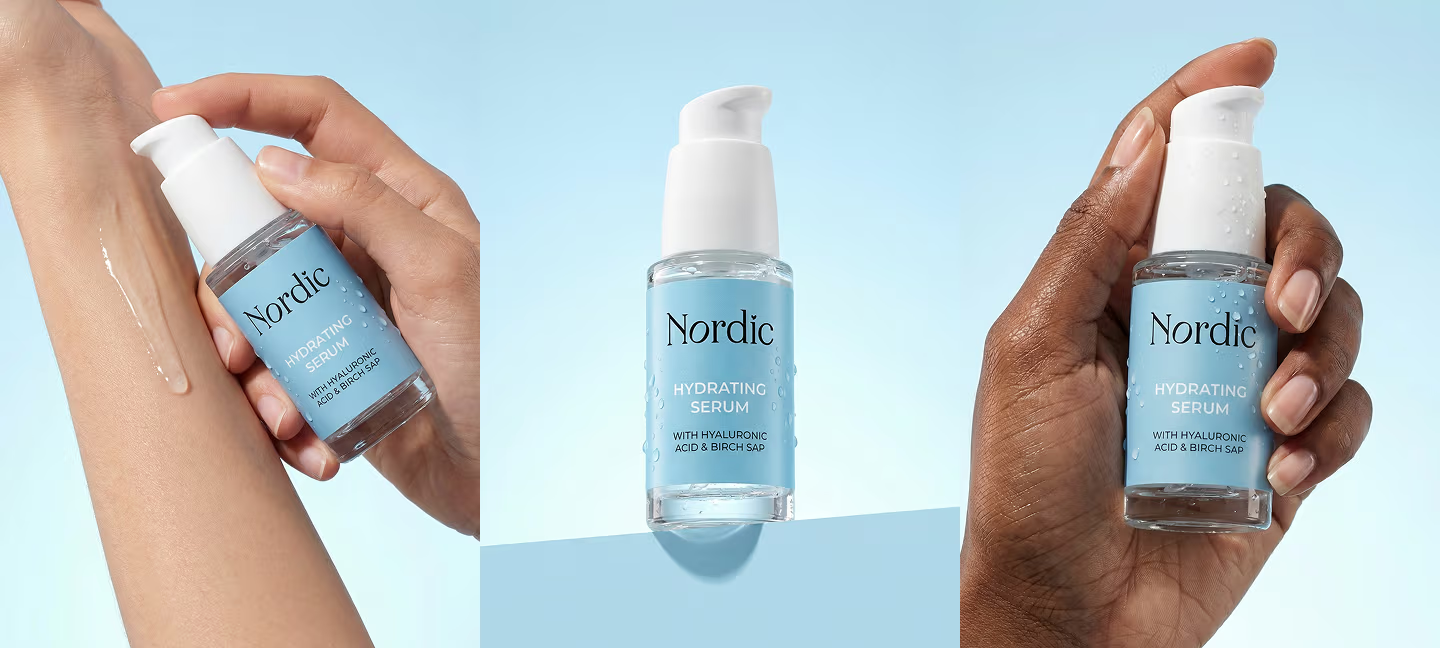
Beispielsweise kann unser Team mithilfe von Nano Banana Pro in Freepik Spaces mehrere Produktfotografievarianten, Umgebungen oder unterstützende Grafiken erstellen. Das Ziel besteht nicht darin, die KI die ganze Anzeige erfinden zu lassen. Ziel ist es, flexible visuelle Komponenten zu generieren, die später in einem von Menschen geschaffenen Designsystem verwendet werden können.
Diese Unterscheidung ist sehr wichtig.
Denn wenn die KI nur für einen kontrollierten Teil des Outputs verantwortlich ist, fühlt sich das Endergebnis viel gewollter und viel weniger allgemein an.
Schritt 4: Stellen Sie die endgültige Komposition in einem menschlichen Designsystem zusammen
Hier kommt Figma Buzz ins Spiel.
Figma Buzz an sich ist nicht wirklich „der KI-Teil“ des Prozesses. Und genau das ist der Punkt. KI soll nicht alles machen.
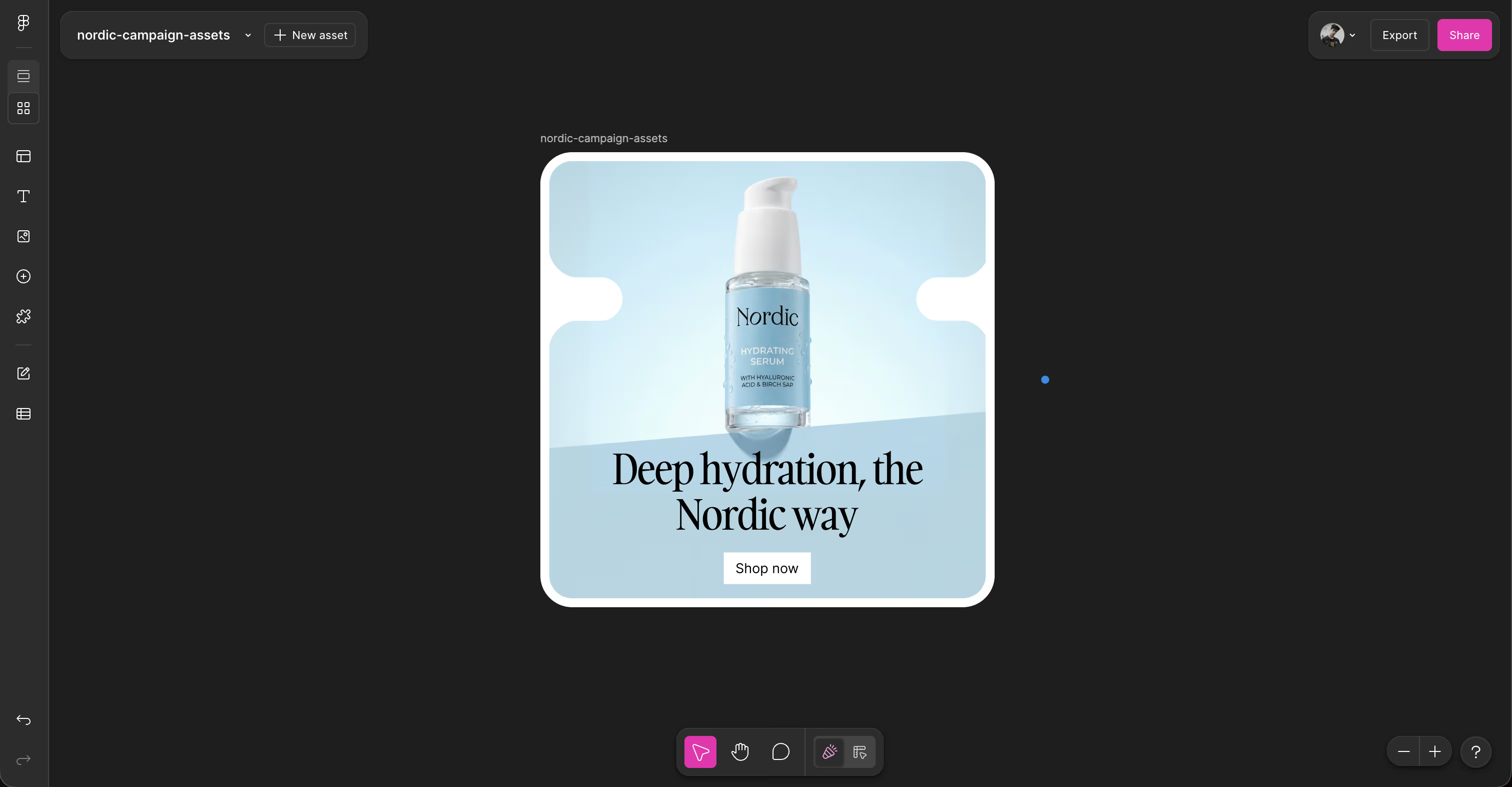
In diesem Schritt werden die generierten Bilder in ein von einem Menschen entworfenes Layout gebracht: Typografie, Abstand, Hierarchie, CTA-Platzierung, Rasterlogik und Markenkomposition werden bewusst festgelegt.
Anstatt also KI zu bitten, ein fertiges Marketingmaterial von Grund auf neu zu erstellen, verwenden wir es, um kontrollierte Inhaltsstoffe herzustellen, die unsere Designer dann zu einer breiteren Komposition zusammenfügen.
So behalten wir unsere kreative Freiheit.
Wir entscheiden, was fest und von Menschen gemacht bleiben soll und was flexibel und KI-unterstützt bleiben kann.
Schritt 5: Leistung messen und im Laufe der Zeit verbessern
Sobald die Assets erstellt sind, ist die Arbeit noch nicht abgeschlossen.
Sie werden auf den relevanten Kanälen veröffentlicht, egal ob es sich um Instagram, Facebook, E-Mail oder die Website handelt. Von dort aus überwachen wir die Leistung und vergleichen sie mit früheren Inhalten, Formaten und kreativen Ausrichtungen.
Das ermöglicht es uns, im Laufe der Zeit kleine, aber sinnvolle Upgrades vorzunehmen.
Anstatt eine Marke jeden Monat neu zu gestalten, verbessern wir sie durch maßvolle Iterationen. Bessere Zusammensetzung. Bessere Haken. Besserer Produktfokus. Bessere Klarheit. Bessere Konsistenz.
Auf diese Weise findet langfristiges Wachstum statt, während der Markencode intakt bleibt.
Die Kontroverse um die Zukunft der Designer
Wir bei WK8 glauben fest an das Potenzial von KI, kreative Prozesse effizienter zu gestalten und Aufgaben zu skalieren, die zuvor nicht realistisch skalierbar waren.
Aber das ist etwas ganz anderes als zu sagen, dass es Designer ersetzt.
Design ist nicht nur Ausführung. Es ist Urteilsvermögen. Es ist Zurückhaltung. Es geht darum, den Kontext zu verstehen. Es geht darum zu wissen, was nicht zu tun. Es übersetzt eine Marke in etwas, das die Leute fühlen und nicht nur sehen können.
Dies sind Bereiche, in denen menschliche Kreative immer noch von enormer Bedeutung sind.
Es gibt auch eine zunehmende Müdigkeit in Bezug auf qualitativ minderwertige KI-generierte Inhalte. Die Menschen werden immer besser darin, sie zu erkennen, und in vielen Fällen reagieren sie bereits darauf. Je mehr synthetische Inhalte den Markt überfluten, desto wertvoller wird vorsätzliches, von Menschen geführtes Arbeiten.
Deshalb sehen wir die Zukunft nicht als „KI versus Designer“.
Wir sehen es als Designer mit besseren Systemen, stärkerer Hebelwirkung und schnellerer Ausführung.
Und über das Design hinaus glauben wir, dass KI durch humanoide Robotik und fortschrittliche industrielle Systeme zunehmend auch in der physischen Welt Einzug halten wird. Dies sind Bereiche, in denen Automatisierung offensichtlich sinnvoll ist, insbesondere bei sich wiederholenden oder gefährlichen Aufgaben.
Die kreative Richtung ist anders. Der Geschmack ist anders. Markensensibilität ist anders.
Deshalb glauben wir, dass die Rolle des Designers nicht verschwindet. Sie entwickelt sich weiter.
Fazit
KI ersetzt keine menschlichen Designer. Sie macht starke Designer schneller, skalierbarer und in der Lage, großvolumige Arbeiten zu produzieren, ohne die Kernidentität der Marke zu verlieren.
Es gibt einen sehr schmalen Grat zwischen KI-Slop und einem wirklich starken Asset.
Unserer Ansicht nach ist diese Linie nicht das richtige Werkzeug. Es ist das Team, das dahinter steht.
Wenn professionelle Designer KI-Modelle als Werkzeuge in einem strukturierten, kontrollierten Arbeitsablauf verwenden, ersetzt KI nicht Kreativität. Sie gibt der Kreativität mehr Raum zur Entfaltung.


