

Wordpress vs Webflow: Which one to choose for your business?
In the world of high-performance digital marketing, choosing the right website platform is critical. WordPress and Webflow are two leading options, each with their own strengths. Selecting the wrong one can lead to headaches from security scares to sluggish marketing execution. This comprehensive guide explores WordPress vs Webflow in depth to help you make an informed decision. We’ll also go beyond the CMS itself, looking at how your website can become a data-driven growth engine for your business.

Looking for a strategic marketing partner?
Scaling your business to outgrow competition.
30 min free consulting call with our experts
Key takeaways
- The choice between WordPress and Webflow is strategic – it affects speed of execution, security, brand consistency, and long-term growth.
- WordPress = flexibility with high maintenance – powerful for complex builds but brings plugin bloat, security risks, performance issues, and higher ongoing costs.
- Webflow = modern, all-in-one platform – fast, secure, SEO-friendly, and built for marketers to edit content and collaborate without relying heavily on developers.
- Your CMS is just the foundation – real impact comes from data, CRO, personalization, integrations, and automation that turn the website into a growth engine.
- Practical rule of thumb – choose Webflow for most marketing sites; choose WordPress only when you truly need complex e-commerce or custom backend logic and have dev resources to manage it.
Facing the Website Platform Dilemma
Every modern business needs a website that not only looks great but also drives conversions. The dilemma is clear: do you stick with the familiar flexibility of WordPress, or embrace the modern efficiency of Webflow? This choice isn’t just technical, it has strategic implications for marketing agility, brand consistency, and long-term growth.
Many companies default to WordPress because it powers a large portion of the web, it's free and open source. Others are intrigued by Webflow’s no-code promise of fast, visually-driven development. If you choose a platform that doesn’t align with your needs, you might face issues like:
In short, the core problem is uncertainty about which platform will set your business up for success without burdensome trade-offs. It’s a significant decision with long-term consequences.
The Hidden Pitfalls of Choosing the Wrong CMS
Let’s delve into the potential pain points if you go down the wrong path. For many businesses, WordPress is the default choice because it’s popular and highly flexible. But that flexibility comes with baggage that can cause problems that slow down your growth.
Plugin Chaos and Maintenance Nightmares
WordPress relies heavily on third-party plugins for added functionality (SEO, forms, performance, security, e-commerce, etc.). As you install more plugins, you introduce more potential points of failure. Updates can conflict and even crash your entire site if something breaks. In fact, over 55% of WordPress vulnerabilities stem from plugins (WPScan, 2023). Keeping dozens of plugins up-to-date, each with separate logins and subscriptions, becomes a time-consuming, expensive juggling act.
Security Risks and Downtime
WordPress’s open-source nature means you’re responsible for security patches, hosting, and updates. Miss one critical update or use an outdated plugin, and you open the door to hackers. It’s telling that while WordPress powers ~43% of websites, it accounts for 90% of hacked CMS sites (per Sucuri, 2023). One vulnerable plugin or weak password can bring your site down or compromise customer data. For marketing teams, that means urgent “fire drills” to fix the site instead of focusing on campaigns.
Slow Performance and Technical Debt
Achieving top-notch site speed and SEO on WordPress often requires expert tweaking with additional plugins for optimizing images, configuring caching plugins, choosing the right hosting, etc. If done poorly, WordPress sites can run slow, hurting user experience and search rankings. You may find yourself hiring developers to patch performance issues regularly. Every technical issue that arises is time not spent on growth.

Brand Inconsistency
With WordPress, different plugins and themes can introduce inconsistent styling or behavior. Unless you invest in a custom design system from the get-go, a WordPress site can become a patchwork. For instance, your blog plugin might use slightly different button styles than your e-commerce section, subtly diluting brand consistency. Without careful governance, the visual cohesion of your brand can suffer as your site evolves.
Scattered Integrations & Data Silos
WordPress can integrate with almost anything via plugins or custom code, but that often means multiple dashboards and systems to manage. Your forms might feed into one system, your shop into another, and your analytics require extra plugin configurations. Data ends up scattered, and getting a unified view of website performance or customer behavior becomes a project of its own. This complexity can stall your efforts to build a seamless marketing stack.
The more you rely on a platform that isn’t built for marketing efficiency, the more these pain points grow. We’ve seen businesses come to us after wrestling with a bloated WordPress setup: their site was technically versatile, yes, but marketing campaigns took forever to implement and every new feature risked breaking something. It’s a classic case of the tool dictating the process, instead of enabling it.
Choosing a Future-Proof Platform and making the best out of it
It’s time for the solution phase: how do we solve these issues and pick the right platform for long-term success? At WK8, we approach this decision through the lens of sustainable growth and data-driven strategy. The solution isn’t one-size-fits-all, but for most businesses outside of very complex e-commerce, our experience shows Webflow is a game-changer. Let me tell you why:
1. High-Performance Execution with Webflow: Webflow is built for speed and stability. It provides integrated hosting on a global CDN, which means your site loads fast without needing extra plugins or caching layers. SEO is baked in generating automatic sitemaps, clean code, and responsive design out of the box. You won’t need to install half a dozen plugins just to get basic on-page SEO or performance optimization because Webflow is natively optimized. The result is a website that’s technically excellent from day one, helping you rank well on Google and delight users with quick load times.
2. Security and Peace of Mind: With Webflow, security is largely handled for you by the platform. You get enterprise-grade protections (AWS hosting, Fastly CDN, SSL certificates, SOC 2 compliance) without lifting a finger. There are no PHP plugins to update and no servers problems to handle. Webflow’s team manages the infrastructure and automatically rolls out updates. This drastically reduces your exposure to attacks. In contrast, a WordPress site demands constant vigilance to keep hackers at bay. By eliminating common vulnerabilities, Webflow ensures your site stays up and your team stays focused on growth, not unnecessary emergencies.
3. Ease of Use for Content Editors: A website is a living marketing asset, and your team needs to update it regularly with new content, landing pages, or tweaks. Webflow’s Editor and intuitive CMS make it easy for non-technical team members to edit text, images, or even create new pages from pre-designed components. Editors can enter a safe Edit Mode where they can change content without breaking design/layout. This means your marketing team can now publish a new case study or update a headline on the fly, without always waiting on a developer or agency. WordPress also has a content editor (Gutenberg or classic), but the experience can be inconsistent, especially if your site heavily relies on custom fields or page builder plugins. Many WordPress users hesitate to make changes for fear of disrupting something. Webflow was built to empower content editors with confidence.
4. Brand Consistency: One of Webflow’s superpowers is the visual designer, which lets developers and designers build responsive layouts with pixel precision. We can set up global style guides, reusable components, and even shared design libraries to enforce your brand guidelines across every page. For companies concerned with brand consistency at scale, this is invaluable. Your marketing team can spin up a new landing page by reusing components that already meet your brand standards. Colors, typography, button styles – all stay consistent because they draw from the same design system. In WordPress, achieving this level of consistency requires either a lot of discipline with your theme/page builder or building a custom design system (often involving custom code). Webflow gives you the best of both the flexibility to create, but with structure to maintain a coherent look and feel. As a result, you safeguard brand consistency even as you rapidly expand your site.
5. Collaboration and Workflow for Teams: Modern marketing is a team sport involving designers, content writers, SEO specialists, and developers all working together. Webflow was built for collaboration with features like Real-Time Collaboration, where multiple team members can work in the designer concurrently, and a recently introduced commenting system right on the canvas. This means your strategist can leave a note for a designer on a specific section, or a copywriter can suggest text changes within the Webflow interface itself. It’s a Google Docs-like collaboration experience, but for web design. Additionally, Webflow’s staging and publishing controls let you preview changes safely. WordPress, in comparison, often requires plugins or external tools for similar collaborative workflows, and real-time co-editing of design is generally not possible. For enterprise scenarios, WordPress solutions exist, but they tend to be clunkier or costly. Webflow’s approach is built-in and seamless, aligning with how modern agile teams work together.
6. Lower Total Cost of Ownership: At first glance, WordPress itself is “free,” and Webflow is a paid service. But the real question is total cost of ownership over time. With WordPress, you’ll likely pay for premium plugins (SEO, security, caching, form builders, etc.), a decent hosting provider, and possibly a developer or agency to maintain it. All those expenses add up. Studies have found that a typical WordPress site can incur hundreds or thousands of dollars annually in plugins, hosting, and maintenance fees. Webflow’s pricing, on the other hand, is simple and clear: a single monthly fee that includes hosting, security, CMS, and all features. Starting around $14–$39/month for most business sites, it’s cost-efficient and predictable. Plus, consider the value of your team’s time: hours not spent troubleshooting WordPress are hours invested in marketing strategy. From that perspective, Webflow often pays for itself.
Now, does this mean WordPress has no place? Not at all. WordPress remains a powerful solution for certain scenarios, especially complex e-commerce or highly specific functionality:
- If you’re building a large online store with thousands of SKUs, multiple payment gateways, and intricate custom workflows, WordPress with WooCommerce might serve you better. WordPress’s ecosystem shines in extensibility. If you can dream it, a developer can likely build it or find a plugin for it. It’s no surprise that WordPress (with WooCommerce) is considered more powerful for complex, large-scale stores, whereas Webflow e-commerce is currently best suited for smaller shops.
- If your project requires deep integrations with legacy systems or a level of backend logic that goes beyond what Webflow’s tools and integrations offer, a custom WordPress build can be tailored to fit.
At WK8, we are platform-agnostic in the sense that we’ll recommend what best fits a client’s goals. That said, for the vast majority of marketing-centric websites, Webflow is our go-to because it delivers results faster and with fewer headaches. It enables us to execute high-performance websites and creative campaigns for clients without getting bogged down in technical issues. Our focus is on measurable growth and long-term partnerships, and we’ve found Webflow aligns perfectly with that philosophy by providing a stable, scalable foundation.
WordPress vs Webflow: Quick Comparison
To summarize the key differences and use-cases, here’s a quick side-by-side comparison of WordPress and Webflow:
As the comparison shows, Webflow caters to modern marketing needs with an all-in-one approach, whereas WordPress offers ultimate flexibility at the cost of more hands-on management. It’s no wonder that Webflow is often recommended for ease-of-use and built-in performance, and WordPress for maximum flexibility if you have the technical support.
Beyond the Platform: Turning Your Website into a Growth Engine
Choosing the right CMS is a critical step, but it’s just the beginning of a successful digital strategy. Whether you go with WordPress or Webflow, your website should not remain a static online brochure. It needs to be a living, data-driven growth engine for your business. This is where many companies fall short: they pick a platform and launch a site, but don’t fully leverage it for marketing and intelligence.
At WK8, we emphasize a multichannel approach. Here are key areas to focus on beyond the CMS decision:
- Data Collection & Analytics: Ensure your site is instrumented to collect meaningful data. This includes integrating analytics to track traffic, user behavior, conversions and much more. With Webflow, adding tracking scripts or pixels is straightforward, and the platform now even offers Webflow Analyze natively to surface key insights. In WordPress, you’ll likely use Google Analytics or another tool via a plugin. The goal is the same: turn raw visitor data into actionable insights.
- Conversion Rate Optimization (CRO): Your site should constantly evolve based on what the data tells you. Webflow recently introduced Webflow Optimize, an integrated A/B testing and personalization tool that leverages AI for optimizing conversions. This makes it much easier to run experiments (like testing different headlines or CTAs) and even personalize content for different audience segments directly within Webflow’s interface. On WordPress, implementing A/B testing or personalization might require external services or complex plugin setups, which can be extremely complicated to execute well in comparison. Regardless of platform, make sure you’re testing and iterating: small tweaks can yield big improvements in lead generation and sales.
- Personalization & Customer Experience: Today’s users expect tailored experiences. With Webflow Optimize, you can show personalized content (like different homepage sections for returning customers vs. new visitors) without heavy coding. If your business uses WordPress, you can still achieve personalization but likely via third-party marketing automation tools or custom development that identifies users and swaps content after page load, which can cause visual glitches and negatively impact SEO. The key is to treat your website less like a one-size-fits-all brochure and more like a dynamic conversation with each visitor. The technology to do this is becoming more accessible, and we encourage clients to embrace it to boost engagement.
- Integration with Marketing Stack: A website gains power when connected to your broader marketing and sales ecosystem. That means integrating forms with your CRM (e.g. HubSpot, Salesforce), connecting newsletter signups to your email marketing platform, syncing e-commerce data with inventory or ERP systems, etc. Both WordPress and Webflow can integrate with external systems — WordPress via countless plugins or custom API work, and Webflow via integrations (Zapier, Make) or custom code embeds. We often leverage Webflow’s form webhooks or Zapier integrations to instantly pass leads into a client’s CRM, ensuring no time is lost in follow-up. By hooking your site into your business intelligence pipeline (e.g., sending order data to a dashboard, or user behavior to a analytics warehouse), you turn your website into a rich data source for decision-making.
- Automation & Efficiency: One advantage of a modern platform like Webflow is the focus on automation and streamlining workflows. Need to publish content at a certain schedule? Need to generate landing pages from a database or connect to an external CMS? Webflow’s API and its extensive library of apps can help build automated workflows. Always look for ways to automate repetitive tasks like image optimizations, content tagging, or triggering marketing emails when a user performs an action on the site.
- Long-Term Growth and Support: Finally, think beyond launch. Websites require ongoing nurturing. This is why WK8 operates with a long-term partnership mindset. We don’t just launch a site and walk away; we continuously monitor, analyze, and improve it. With a solid platform foundation (Webflow or WordPress), we then layer on monthly CRO reviews, content updates, technical audits, and strategic enhancements. The right platform makes this easier, for example in Webflow we can quickly clone pages to test new ideas, or use global symbols to update a design element across the whole site in seconds. In WordPress, we ensure that staging environments and proper version control are in place so improvements can be made safely. The mission is to treat your website as a living, evolving asset that drives sustainable scaling of your business, not a one-and-done project.
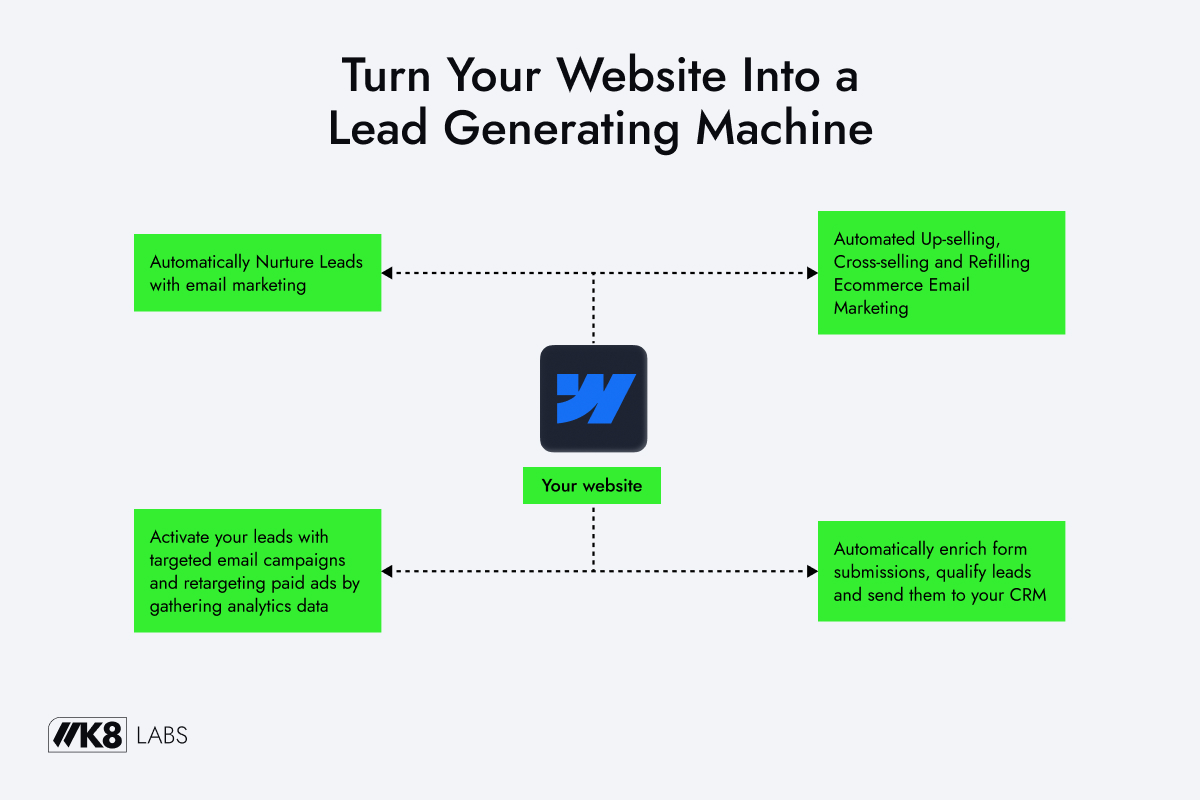
By focusing on these aspects, you ensure that whichever platform you choose, its strengths are fully utilized in service of your growth. WordPress vs Webflow is an important question, but it’s one piece of a bigger puzzle. A high-performance website, integrated with data and optimized continuously, becomes a pillar of your customer acquisition and retention strategy.
Final verdict: WordPress or Webflow? Our Perspective for Your Business
Deciding between WordPress and Webflow comes down to your business’s specific needs and resources. Both are powerful in their own way. WordPress offers unparalleled flexibility and a plugin for just about anything you can imagine. Webflow offers an all-in-one, modern platform that prioritizes speed, security, and collaboration.
If you’re a large enterprise with a complex e-commerce catalog or need a very tailor-made backend solution, WordPress (or even another enterprise CMS) might be the right choice. With the proper development team in place, WordPress can be molded to do virtually anything. We do occasionally leverage WordPress for clients when an existing WordPress ecosystem or a highly unique feature set dictates its use. In those cases, we mitigate its risks by applying our expertise in security hardening, performance tuning, and design systems to keep it running smoothly.
For most other business website projects, however, Webflow is our recommended choice. We’ve seen first-hand how it empowers marketing teams to move faster without sacrificing quality or stability. By using Webflow, we can build high-performance websites engineered for conversion and backed by clean, maintainable systems. It lets us create creative brand systems (design components, style guides) directly in the canvas, so your site scales effortlessly as new pages or sections are added. And it aligns perfectly with a data-driven approach, from native SEO features to easy integrations for analytics and personalization.
In our experience as a data-driven digital agency, the equation is simple: the less time you spend wrestling with technical issues, the more time you can spend on strategic growth. Webflow minimizes technical friction, which means we and our clients can focus on what really matters: crafting compelling content, improving user experience, and experimenting with new ideas to drive conversions. It’s a platform choice that supports long-term, measurable growth, rather than just short-term convenience.
Our advice: evaluate your priorities. Is it speed of implementation and low maintenance? Go Webflow. Need infinite flexibility and don’t mind the upkeep? WordPress could work. And remember, this choice isn’t final forever, many businesses start on WordPress and later migrate to Webflow when maintenance becomes too burdensome (we’ve guided several clients through this transition for that very reason). The reverse is less common, but a Webflow site could migrate to WordPress if ever the scope truly demands it.
In the end, choosing WordPress vs Webflow is about aligning with your long-term growth goals. We’re here to help you make that choice and build an online presence that isn’t just a website, but a resilient, data-fueled engine for your business’s success.


